
There's no Royal Reels app in the App Store or Google Play, and no official APK either, whatever a mirror's marketing banner claims. That's a fixed constraint, tied to the same licensing gap covered on The Royal Reels page, not a feature still in development. The part most guides skip: how to get a working substitute onto your phone, and why a file calling itself a "Royal Reels APK" is a bigger warning sign than it looks.
Why no native app exists
Apple and Google both restrict real-money gambling apps to operators licensed in a short list of markets, mainly the UK, a handful of EU states and a few licensed US states, vetted case by case before a listing goes live. A Curacao-licensed operator isn't on that list, and Royal Reels specifically isn't licensed for Australia at all: the Royal Reels Casino Australia legal status section covers the ACMA's 2023 Formal Warning and ISP-blocking request in full. A store listing built around an Australia-facing casino brand would fail app review outright. That rule applies to every mirror equally: a new domain number doesn't change Apple's or Google's policy.
Setting up the home-screen version
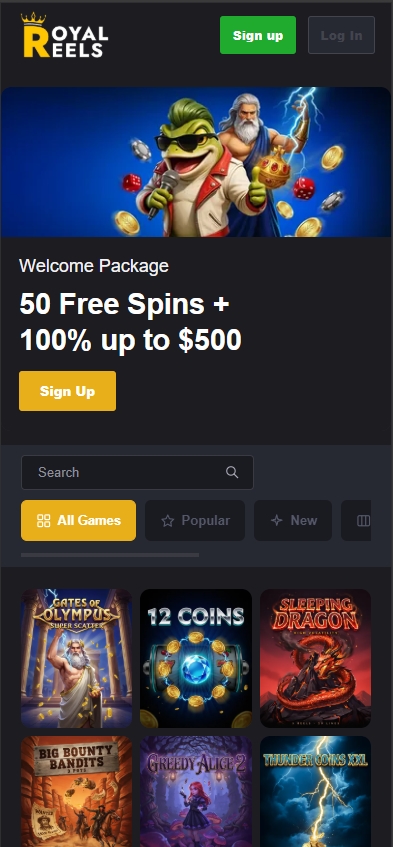
"Add to Home Screen" is the actual substitute, and it's closer to a real app than it sounds: a full-screen icon with no address bar, launched with one tap, running the same slot library, live tables and cashier as desktop. The steps differ by phone, and the browser you use matters more than most people expect.
On iPhone (Safari only)
- Open the site in Safari, not Chrome. iOS blocks other browsers from installing a home-screen icon with full-screen behaviour, a Safari-only restriction Apple applies system-wide, not something specific to this operator.
- Tap the Share icon in the address bar.
- Scroll down and tap "Add to Home Screen."
- Confirm the name and tap "Add" in the top-right corner.
On Android (Chrome)
- Open the site in Chrome.
- Tap the three-dot menu in the top-right corner.
- Tap "Add to Home screen," then "Install" when prompted.
- Confirm the name it suggests.
One catch: the icon is tied to the exact domain you installed it from. When that mirror gets blocked and the operator moves to the next number (part of the mirror-domain pattern documented on the main review), the old icon just stops opening. It doesn't update itself, so redo the setup on whichever mirror is live.
App vs. home-screen version
| Feature | A store-listed native app | Royal Reels, home-screen version |
|---|---|---|
| Install source | App Store / Google Play, vetted before listing | Browser install, no store review of any kind |
| Push notifications | Native OS notifications | None; promos arrive by email or SMS instead |
| Biometric login | Face ID / fingerprint built in | Only what your phone's password manager or browser autofill offers |
| Updates | Pushed automatically through the store | Instant, since it's just the live website |
| Offline access | Some cached assets, menus at least | None; no connection means no access at all |
| Storage used | Tens to hundreds of MB on your phone | None; it's a bookmark with an icon, not an install |
The updates row is the one genuine advantage over a native app: there's no version to fall behind on, since every visit loads the current live site. Everything else on that table is a real trade-off, not a rounding error. Without push notifications, catching a bonus alert means checking email or SMS instead of waiting for your phone to buzz.
The real APK risk
Because no official APK exists, any file using that name wasn't built by the operator, full stop. Installing one means sideloading an unverified package, which on most Android phones requires manually disabling Play Protect first, the exact permission a legitimate app would never need you to grant. Whoever built that file controls what it actually does once it's on your phone, and "logs into your Royal Reels account" is the least concerning thing it could be doing in the background.
This risk compounds with the mirror problem already documented on the login page's fake-mirror section: an operator whose domain changes constantly trains players to expect a moving target, which is exactly the cover a fake APK or lookalike download page relies on. Treat "download the app here" the same way you'd treat an unexpected login link, as a prompt to stop, not to click through. The real fix, if you've already installed one, is the same as a compromised password: uninstall it, run a security scan, and change your Royal Reels password from a browser you trust, since a fake app is a more direct route to your credentials than a fake login page ever is.
Mobile browser specifics
Safari, Chrome, Samsung Internet and Firefox on a current iOS or Android version all run the site without issue; an outdated browser version is a more common cause of a broken layout than the site itself. Live dealer tables stream video and chew through noticeably more data per hour than spinning pokies, easy to forget until a blackjack session eats into a capped mobile plan. There's no separate lightweight mode for slower connections, so a weak signal affects the live studio well before it affects a slot spin.
